Resources Hub


Without Design To Cost Intelligence, Your Digital Thread Is a Data Highway to Nowhere

Mark Rushton
— August 18, 2026
Listen to this Article
1×
00:00
00:00
Key Takeaways:
- Your digital thread was built to connect product lifecycle systems—not to influence decisions. CAD, PLM, ERP, and MES are synced, but design engineers are still exporting geometry and waiting days for cost feedback. Integration without intervention is just faster documentation
- Design to cost (DTC) only works when manufacturing intelligence is present at the moment of design. Often, 70% to 80% of product cost is locked in during early design, and before any formal cost review. If your DTC strategy depends on feedback that arrives after the geometry is set, you’re managing outcomes rather than shaping them
- A decision-grade digital thread closes the gap between product lifecycle data and the design decisions that determine margin. Arguably, the right metric isn’t system connectivity. It’s decision influence rate: how many design decisions are made with real-time, contextual manufacturing intelligence already in the loop
The Full Article
Your Digital Thread Is Working—That’s the Problem
You’ve connected CAD to PLM, PLM to ERP, and ERP to the manufacturing execution system (MES). The data moves. The dashboards update. At some point in the process, a spreadsheet is opened to build a cost model or to calculate costs. Integration without intervention is just faster irrelevance.
The purpose of the digital thread is to connect a data framework, creating a single, consistent, traceable flow of information across a product’s entire lifecycle. The decision to adopt a digital thread is typically made at the program or enterprise level, driven by the measurable costs of disconnected data that result in rework, audit failures, and version mismatches. It is often introduced after PLM, ERP, and engineering tools are standardized enough to integrate. However, it is rarely a single decision but a deliberate investment justified by specific pain points.
The ultimate goal is to connect CAD to FEA to PLM to ERP to ensure full traceability across product development without having to reconstruct the chain of siloed data from each stage of development.
The Integration Success Trap
Congratulations. Your digital thread works. CAD talks to PLM. PLM syncs to ERP. Shop floor data flows back through MES. The architecture diagram your IT team presented last year has been fully realized, and every system reflects the latest design state.
Now ask yourself this: when your design engineer chose between two material options last Tuesday, what data did they actually use to make that call?
Odds are: a spreadsheet they maintain themselves. A supplier quote was emailed three weeks ago. A gut instinct shaped by the last program they worked on. Maybe a conversation in the hall with a cost estimator who’s currently buried in a different program.
The digital thread was running perfectly the entire time. It just wasn’t in the room.
“Integration moves data. It doesn’t create insight. And insight that arrives after the decision isn’t insight—it’s a postmortem.”
This is the integration success trap. You’ve measured progress by system connectivity, not by decision quality. Your thread is technically complete. But the decisions that determine 70–80% of your product’s cost are still being made outside it.
Data Flow vs. Decision Flow
Most manufacturers have solved the wrong problem. Your systems are connected — CAD talks to PLM, PLM feeds ERP, ERP syncs with the shop floor.
But all that integration stops the moment it matters most: when an engineer is staring at two design options and needs cost data to make a confident call. Instead, geometry is exported manually, spreadsheets get built, suppliers get emailed, and by the time any real cost signal arrives, the design is already committed. That’s not a data problem. It’s a decision problem that locks in 70–80% of your product cost before the cost review even happens. And without digital transformation, it is difficult to connect decisions to data.
Digital transformation enables an organization to record not just what changed in a product, but why it changed. It links every design decision, requirement shift, or material substitution to the analysis, test result, or regulatory driver that caused it.
The purpose is accountability and speed. When a problem is identified, the cause can be traced back through the thread in hours rather than weeks. Moreover, when a change is proposed, its downstream impact on cost, weight, schedule, and certification can be assessed before it is made rather than after the fact.
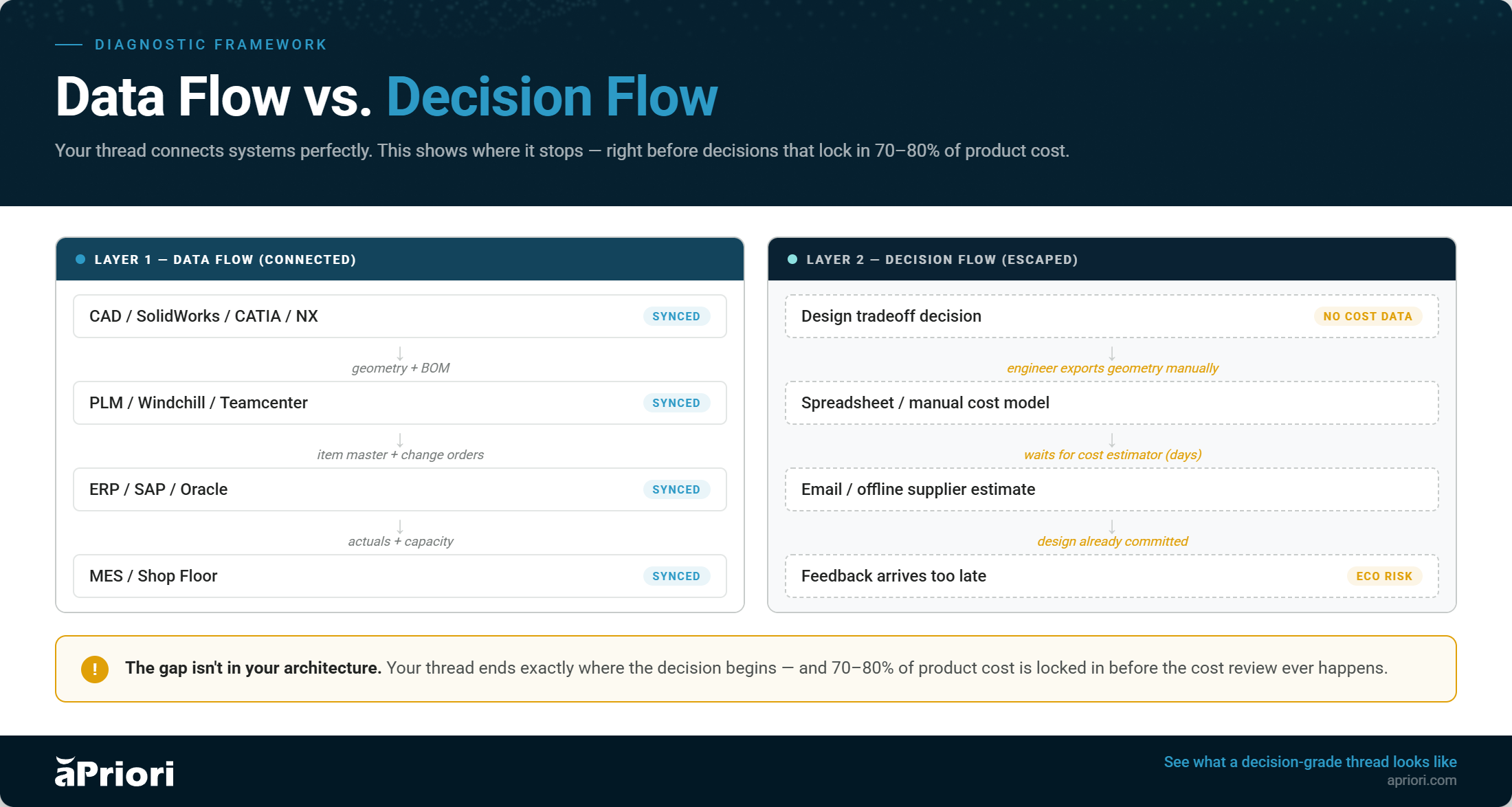
You’ve Reduced Data Friction. Not Decision Friction.
When teams build digital threads, they’re solving for data availability. Can the right person access the right information? That’s a necessary problem to solve. However, it’s not the problem costing you margin.
The real problem is decision friction. The gap between a designer asking a question and getting a reliable, contextual answer they can act on without leaving their workflow.
These aren’t the same problem. And solving one doesn’t solve the other. Here’s an example:
The scenario: A design engineer at a mid-size industrial equipment manufacturer is finalizing a structural aluminum housing that connects the drivetrain to the frame. The digital thread is fully operational — CAD connects to PLM, PLM feeds ERP, demand forecasts are current. Every system reflects the latest design state.
The decision: CNC machined from billet aluminum or aluminum die casting. Both are viable. Both meet the structural and tolerance requirements.
The engineer does what the digital thread enables well. She confirms the geometry in CAD, validates fits and clearances, checks the material spec, and updates the BOM in PLM. She defaults to machined — it’s what the last three programs used, tooling conversations don’t need to happen, and the prototype timeline is tighter. The digital thread records every step. Traceable, version-controlled, synchronized.
What The Digital Thread Didn’t Reveal
At this program’s production volume, machining is the wrong process choice by a significant margin.
The program is projected at 1,800 units per year. At that volume, CNC machining from billet runs approximately $195 per unit — dominated by cycle time, setup, and material removal. The geometry has internal channels and consolidated features that would transfer cleanly to die casting with minor design adjustments. Die-cast tooling for this part costs approximately $90,000, amortized over the program life. The per-unit cost in die casting drops to roughly $42. At 1,800 units annually, that’s a cost difference of over $275,000 per year.
The production forecast existed in ERP. The geometry existed in CAD. aPriori’s manufacturing process models could have synthesized both into a process cost comparison at the point of decision. None of it was present in her design environment when she committed the geometry.
Three weeks later, the cost review flags the housing as the single largest cost driver on the BOM. The program team looks at die casting. The answer is yes — but not without an ECO. Die casting requires draft angles that the current geometry lacks, minimum wall-thickness adjustments, and the elimination of a machined undercut that can’t be pulled from a die. That’s a redesign, a new stress analysis run, an updated BOM, and a four- to six-week schedule slip.
The Digital Thread Did Exactly What It Was Designed To Do
It connected systems, preserved traceability, and kept every record up to date. It just wasn’t in the room when the decision was made.
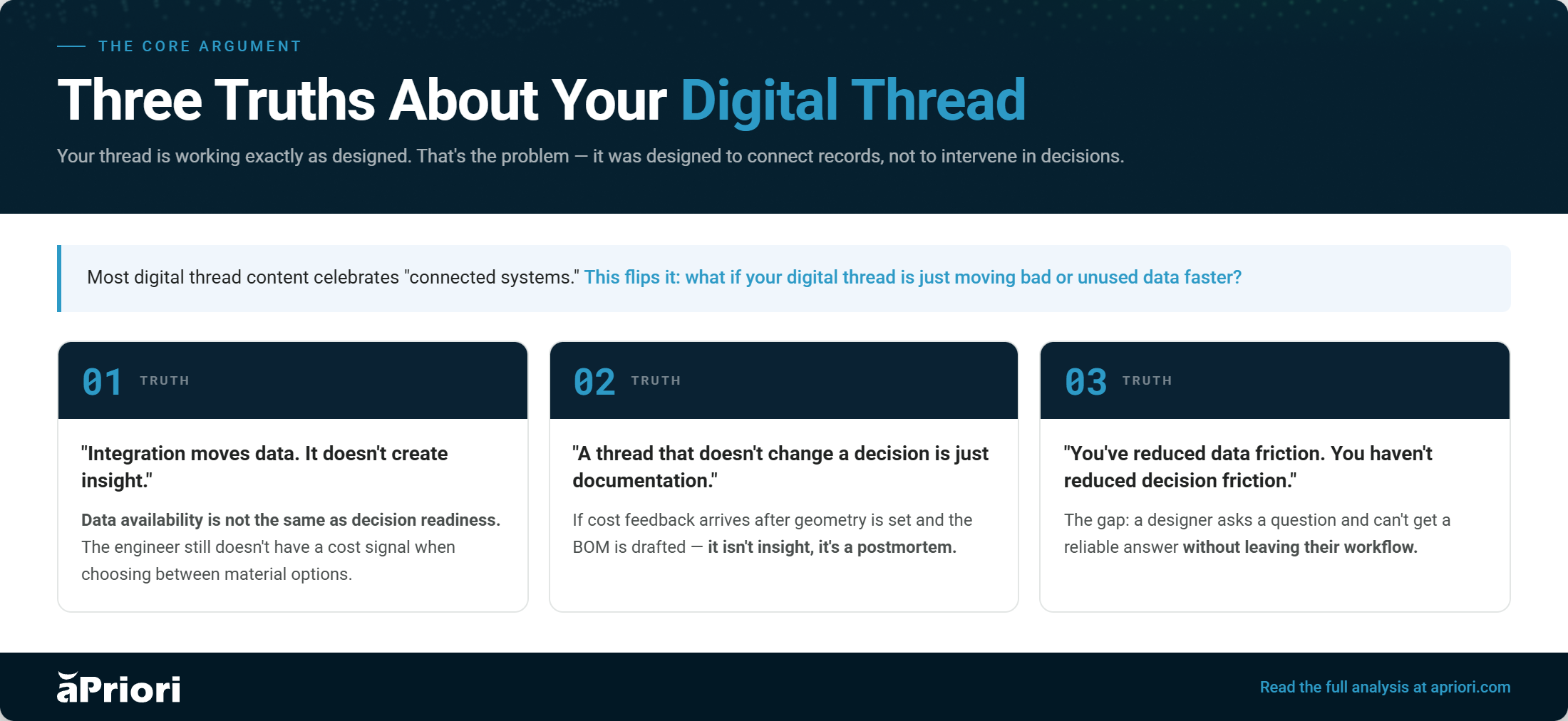
Think about the last time a design engineer on your team made a significant material or manufacturing process choice. Did they have a real-time, reliable cost signal inside their CAD environment? Or did they make an educated guess, flag it for a cost visibility review, and move on, hoping the numbers would hold?
That workflow isn’t a people problem. It’s a system architecture problem. Your thread is built to connect records. It was never designed to intervene in decisions.
What “Decision-Grade” Actually Means
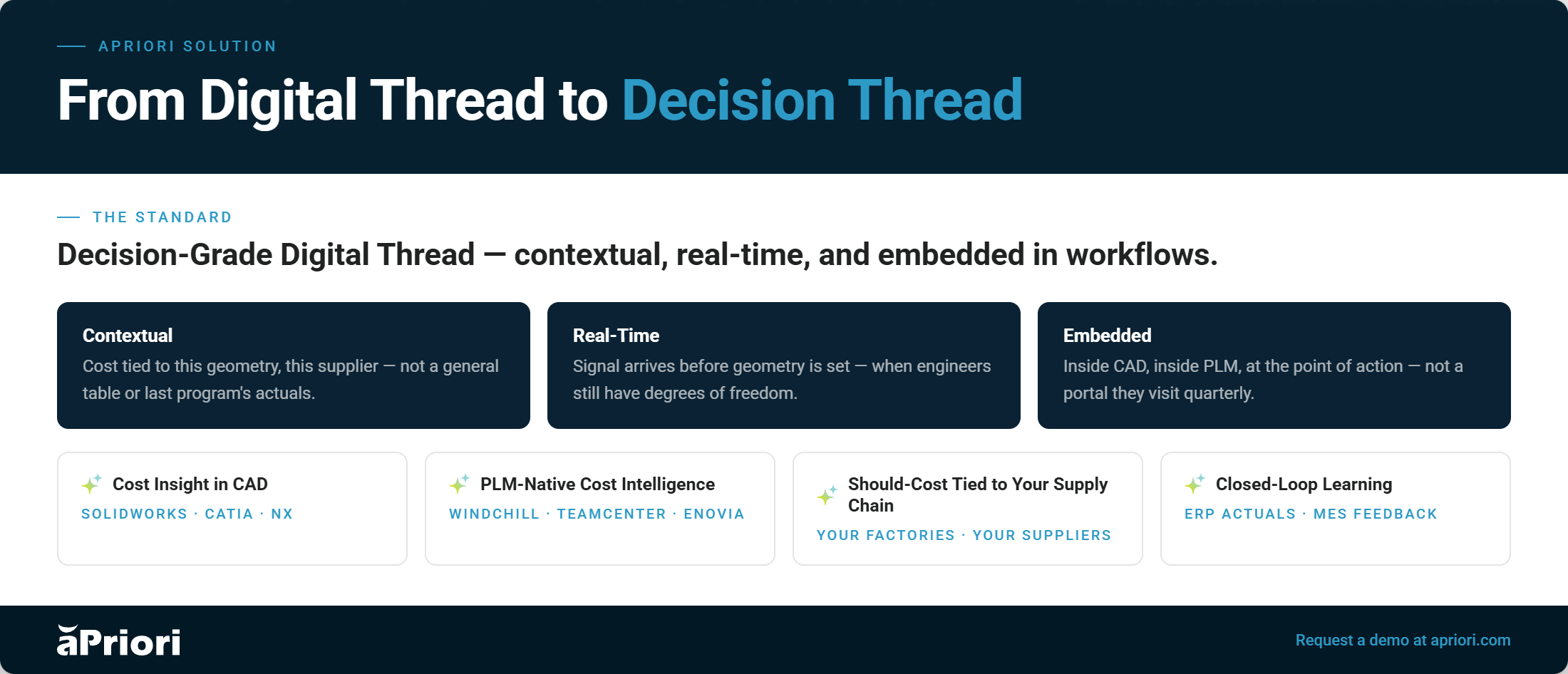
A decision-grade digital thread isn’t a better integration. It’s a different category of capability entirely. The question isn’t whether your systems are connected. It’s whether the thread changes what a design engineer does next.
Three requirements distinguish a decision-grade thread from a documentation-grade one:
Contextual
The data isn’t just accurate. It’s relevant to the specific decision in front of the engineer. Cost driver feedback is tied to this geometry, this material, production volume, and the supplier base. Not a general cost table, and not the last program’s actuals. Only this decision in this moment.
Real-Time
Feedback that arrives in the cost review doesn’t influence the design. By then, the geometry is set, the BOM is drafted, and the change cost is real. Decision-grade means the signal arrives while the engineer still has degrees of freedom, and before the design is committed.
Embedded in Workflow
If the insight requires a tool switch, a data export, or a handoff to another team, it won’t be used. Decision-grade data lives where engineers work—inside CAD, PLM, or surfaces at the point of design action, not in a separate analytics portal they visit quarterly.
The metric isn’t data connectivity. It’s decision influence rate: the percentage of design decisions made with cost and manufacturability data in the loop, in real time.
aPriori: From Digital Thread to Decision Thread
aPriori is purpose-built to close the gap between your connected systems and the decisions your design engineers make inside them. Not by replacing your digital thread, but by making it decision-grade.
Cost Insight in CAD
Real-time should cost and manufacturability feedback is embedded directly without leaving the design environment. Engineers see cost impact as geometry changes, not after the fact.
PLM-Native Cost Intelligence
aPriori integrates with Windchill to surface cost and design for manufacturing (DFM) signals at the BOM level. Now, program teams can make trade decisions with financial context, not just technical context.
Should-Cost Tied to Your Supply Chain
Cost models built on your actual manufacturing processes, regional labor rates, material specs, and supplier data, not generic industry benchmarks. The signal is specific to how you build, not how the market builds.
Closed-Loop Learning
Actuals from ERP and MES feed back into aPriori’s cost models continuously, so estimates tighten over time. Your thread doesn’t just connect, it learns. Every program makes the next one more accurate.
What Changes When Decision-Making Is In The Loop
When cost and manufacturability data are embedded at the point of design decision rather than downstream in the cost review, the leverage is fundamentally different. You’re not catching problems earlier. You’re preventing a category of problem that currently exists because your engineer had no signal when it mattered.
Teams using aPriori embedded in their design workflow typically see meaningful improvement in three areas that matter most to engineering leadership:
- Cost target attainment improves because engineers can self-serve cost feedback iteratively, running dozens of quick checks during design exploration instead of waiting for a gated cost review every few weeks. The design that goes into review is already shaped by cost control awareness, not surprised by it.
- Engineering change orders (ECOs) decrease because a significant portion of them trace back to late-discovered manufacturability gaps or cost overruns. Both are preventable when the signal is in the design loop. Fewer late changes mean faster programs, lower rework costs, accelerated time-to-market, and greater profitability.
- Cost estimating capacity is reclaimed because design engineers handling routine should cost questions frees your cost engineering team for the complex, high-stakes analysis that actually requires human judgment. Your best cost engineers stop being a bottleneck and start being a strategic resource.
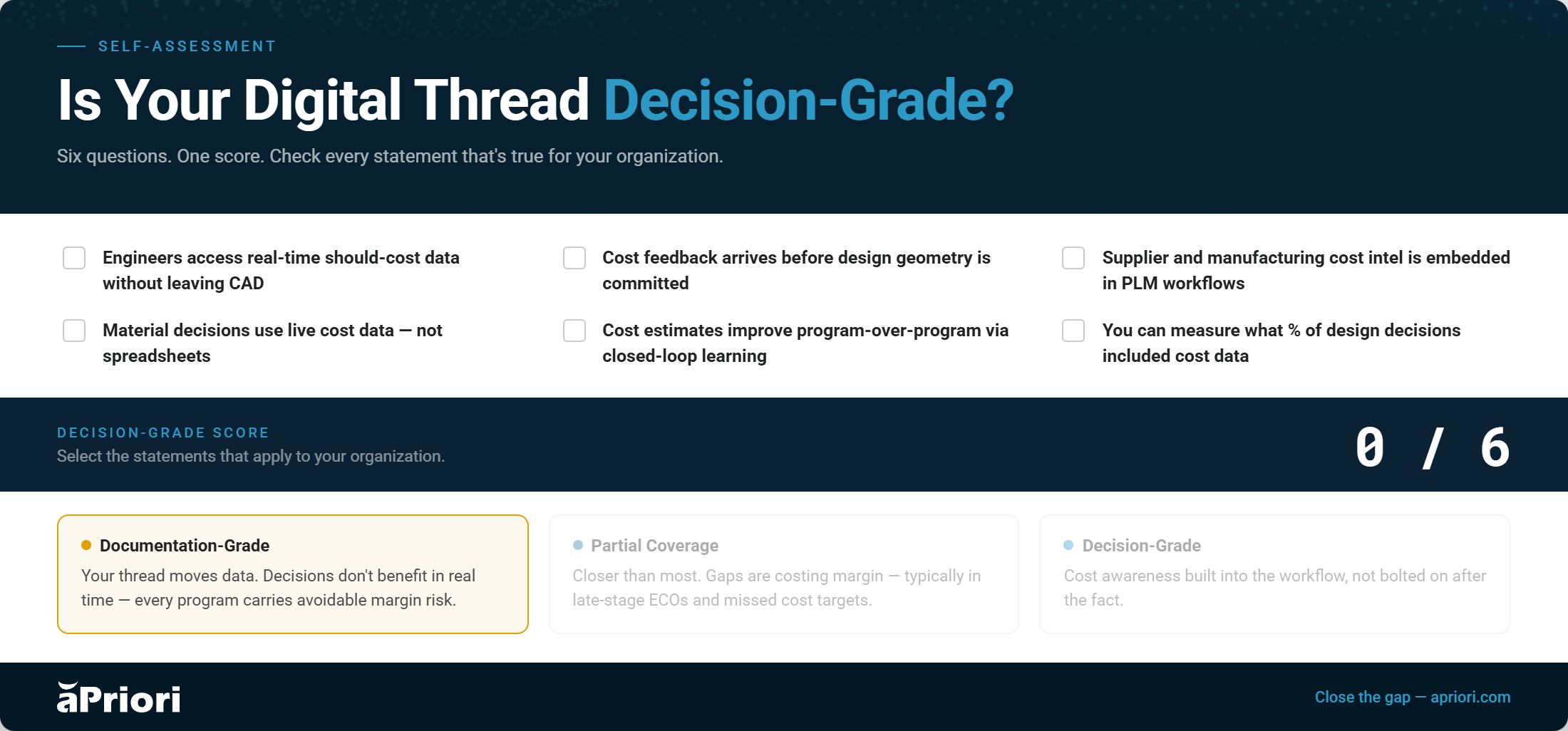
The Question Worth Asking Your Team
Pull up the last three significant design decisions on your current program. For each one: what data did the engineer actually have at the moment of decision? Where did that data come from? How long did it take to get it?
If the answer to that last question is “hours” or “days,” your thread isn’t slow. Your thread isn’t in that decision at all.
The cost of that absence—late-stage changes, missed targets, and absorbed rework—is being paid right now, invisibly, inside programs that look like they’re tracking fine.
You don’t need a better thread. You need a thread that shows up at the moment of decision with something worth saying.
The goal was never to connect systems. It was to make better products faster and at a lower cost. Those are design decisions. And design decisions need design-time data.
See What a Decision-Grade Thread Looks Like
aPriori embeds cost and manufacturability intelligence directly in the tools your design engineers already use. So, insight reaches decisions while there’s still time to change the outcome.





Scale Product Design, Sourcing, & More With Digital Factory Insights
See how teams across the product development lifecycle are using digital factories to identify manufacturability and cost issues early in development, and moreAccess The Guide