Resources Hub


AI for DFM Shouldn’t Have to Learn From Mistakes First

Mark Rushton
— October 8, 2026
Listen to this Article
1×
00:00
00:00
Key Takeaways:
- Draft angle and wall thickness checks cover only the easy 20% of DFM. Secondary operations, materials, and supplier limits cause costly failures
- AI-driven DFM tools should know manufacturing basics on day one. You configure them once instead of training them
- AI built on simulation data gives reliable DFM feedback and avoids hallucination. aiDesign brings that to design engineers
The Full Article:
Ask five engineering teams what “AI-powered DFM” means and you’ll get five different answers. Some mean a chatbot bolted onto a CAD viewer. Others mean a system that improves after enough people flag the same issue. Almost none of them mean the same thing aPriori means by it.
That difference matters more than most buyers realize, because it determines what you get on day one, not day one hundred.
DFM Goes Beyond Draft Angles and Wall Thickness
Most conversations about design for manufacturability (DFM) stop at the basics: draft angle, wall thickness, hole depth-to-diameter ratio. Those matter, but they’re the easy 20%. Rules-based checkers have handled them completely for two decades.
The harder, more expensive failures live somewhere else:
- Secondary operations that get missed until it’s too late. A die casting needs machining afterward, or a part looks fine in CAD but doesn’t work with its anodizing or powder coating spec.
- Material utilization and nesting. How much raw material becomes the part versus scrap (known as the buy-to-fly ratio in Aerospace), and whether a different orientation or process could recover margin.
- Machine- and process-specific feedback. Not “is this manufacturable in theory,” but “can this machine, at this supplier, hold these tolerances.”
- Supplier-specific reality. The same geometry can be a non-issue at one factory and a scrapped part at another, depending on the equipment on the floor.
A tool that only checks draft angles and wall thickness does DFM’s easy homework. The expensive mistakes happen in the categories above. To catch them, a tool must know the manufacturing process and the specific factory, not just the geometry.
AI That Learns From Mistakes Starts Behind
Some platforms position their AI as a system that improves as your team keeps flagging the same issues in DFM reviews. Generously, that’s institutional knowledge capture. Accurately, it means the tool has limited use on day one by definition: it has to watch your team make the mistake, or discuss it, before it can catch it next time.
Manufacturing physics isn’t a mystery each team has to learn on its own. Draft angle requirements, sheet metal bend-to-hole clearances, wall thickness transitions, undercuts, and tool access limits are established engineering fundamentals, not institutional knowledge buried in review comments. A well-built DFM tool should know them before your first upload, the way a good senior engineer knows them on their first day at a new company. That engineer doesn’t need 40 engineering change orders (ECOs) to learn that a 0.3° draft angle is a problem.
That’s the difference between configuration and training, so know which one you’re signing up for. Setting up a digital twin of your supplier’s shop floor, with its machine capabilities, process capacities, and available secondary operations, is configuration: you tell the system once what already exists. Training is different. The system has to collect hundreds of human corrections before its guidance becomes reliable. One is a setup step. The other is a maturity curve you pay to sit through.
Why Grounded AI Beats a Generic LLM Bolted Onto CAD
There’s a second, quieter risk in DFM AI: hallucination. A generic large language model (LLM) that wraps around a CAD viewer can sound confident about a manufacturing recommendation it has no basis for. It matches language patterns and doesn’t simulate a manufacturing process. That’s a poor source of advice when you’re about to spend six figures on tooling.
The alternative is AI that has something real to translate, not something to invent. This is the model behind aiSource, aPriori’s AI negotiation assistant for procurement and commodity teams. It doesn’t generate a strategy from general knowledge of how negotiations work. It translates aPriori’s own deterministic, physics-based should cost and manufacturability data into plain-language guidance a buyer can act on immediately. The AI’s job is interpretation and communication, not invention. Because it draws on real cost and manufacturing data specific to that part and supplier, there’s no hallucination risk the way there is with a general-purpose model guessing at an answer.
Coming soon from aPriori: aiDesign applies the same principle to design engineering and goes further.
Introducing aiDesign
aiDesign adds an AI layer to aP Design, which already accepts 3D CAD models and runs aPriori’s manufacturing simulation engine. It doesn’t replace the analysis. It closes the gap between what the results show and what an engineer needs to do next. It also answers follow-up questions about the results and helps set up further analyses.
In practice, that looks like:
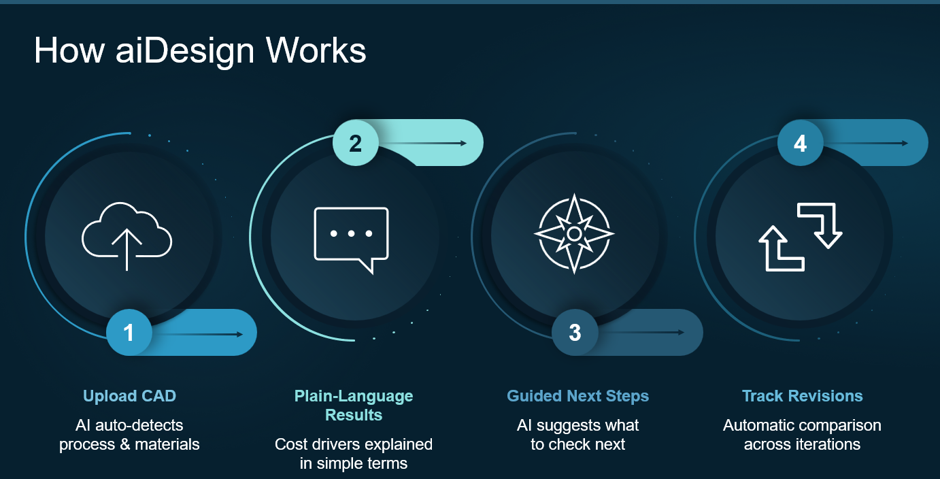
- Upload a CAD model. The system will detect the manufacturing process and material automatically.*
- Plain-language results. The system explains cost drivers and DFM problems in terms an engineer can act on, not a spreadsheet of line items.
- Guided next steps. The AI suggests what to check or fix next, or whether more analyses would be beneficial, so the engineer doesn’t have to prioritize a wall of flags.
- Track revisions. The system compares design iterations automatically, so you see improvement (or regression) at a glance.
*May not be available at launch.
aiDesign runs on the same manufacturing simulation engine aPriori customers already use for cost estimation, DFM, and carbon dioxide equivalent (CO₂e) analysis. It isn’t a general-purpose model with no manufacturing context, so its guidance rests on real physics, not a plausible-sounding guess.
The expected impact follows directly from that. Manufacturability issues surface during design, not after release, so you get fewer ECOs. Manufacturing feedback arrives at the concept stage rather than as late rework, which shortens new product introduction (NPI) cycles. You also get a first analysis in minutes, not days, and you don’t need a cost engineer to start.
Want updates on aiDesign or a spot in the beta? Register here.
This is also where “Quantified DFX” comes in. It treats cost and CO₂e as the measurable units of DFM, so manufacturability becomes a number you compare across iterations, not just a pass/fail flag. It checks that a design meets form, fit, and function requirements while being financially viable and future-friendly, from concept through to a measurable result.
What to Actually Ask a DFM AI Vendor
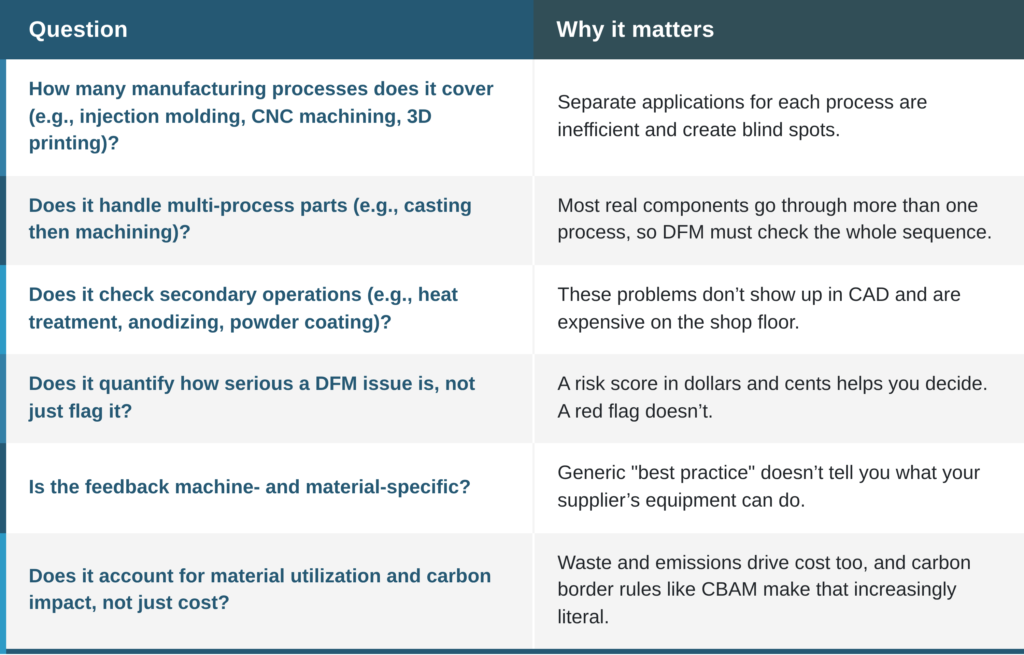
Before you commit to any AI tools for DFM, ask what they rely on, not about the AI itself:
Choose AI-Assisted DFM That Knows Manufacturing on Day One
aPriori, an AI-assisted design review platform, has applied this standard to every DFM analysis it has run. This is the short version of a longer list. Get the full DFM Buyer’s Guide for all 12 questions to ask before you choose a DFM solution, AI-powered or otherwise.





Close The Gap Between Design Intent & Production Reality
Real-time cost, CO₂, and manufacturability analysis is changing how engineering teams make decisions — compressing cycles from weeks to hours.Watch Now