
Resources Hub


LOGIN INSTRUCTIONS PAGE
December 4, 2025CUSTOMER LOGIN HELP
The aPriori Help Center and other aPriori online resources require an authorized account to access them. These accounts are available to all aPriori users with an active license subscription.
Please note that if you are trying to launch aPriori as an application on your PC, and not through the internet, the username and password that you use to login to your aPriori applications are managed by your internal team. These are different from the login details that are needed to login to aPriori online resources.
aPriori Cloud applications
If your organization is licensed for aPriori Cloud, go to https://cloud.apriori.net. You will begin by entering your Customer Code. Click Continue to proceed to the next step.
After entering your customer code:
- You will be prompted to enter your email address.
- If your company uses SSO/SAML, you will automatically be redirected to your organization’s identity provider (IdP) to complete login using your corporate credentials.
- If your company does not use SSO/SAML, you will be prompted to enter your aPriori password (the same one used for the Help Center).
aPriori Help Center
To access the aPriori Help Center, go to https://support.apriori.com and enter your Customer Code and customer support account credentials.
Optional: Create a Bookmark to Skip the Customer Code Step
To streamline login, you can create a personalized bookmark that bypasses the customer code screen:
- Log in to Cloud Home and open Customer Details from your user profile
- Click the button to copy your unique Cloud Home login URL to your clipboard
- Save it as a bookmark to bypass the customer code each time you log in
Troubleshooting
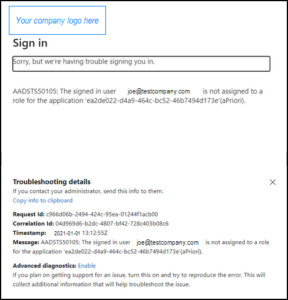
If you receive an error after being redirected to your corporate login page (like the image shown below), please contact your internal IT team for initial assistance to ensure that you’re correctly setup to access aPriori in your company’s identity provider (IdP) and active directory.
Can’t remember your aPriori Customer Login password?
If you are not sure if you already have an account or can’t remember your password:
- Go to https://cloud.apriori.net
- Enter your Customer Code
- Enter your email address and click Continue
- Click Forgot password?
- You will receive an email with instructions to create your password. If you do not receive an e-mail, please check your Spam or Junk email folder or email support@apriori.com for assistance.
- After creating your new password, return to https://support.apriori.com and verify you can login.
Don’t have an aPriori account?
If you do not have a customer support account, but want to access these resources, e-mail customer-account-creation@apriori.com using your company e-mail address. aPriori will verify that you are a licensed customer and create a Help Center account. You can request accounts for multiple users at the same time.
If you do not have a Cloud Home account, contact the person in your organization that manages aPriori. They will file an aPriori support ticket to request that you are added to the cloud environment and assigned to the appropriate aPriori applications.

